
ASUS ROG Ally X vs. Steam Deck OLED Comparing Battery Endurance, Display Quality, and Handheld Gaming Performance
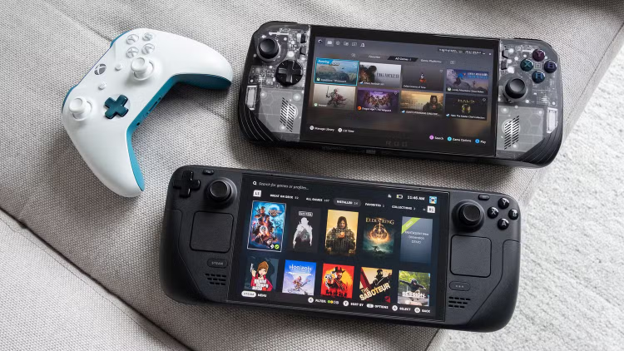
The ROG Ally X was developed with a vision to balance Windows gaming abilities with battery life equally and has arguably delivered on its promise but the Steam Deck OLED was perhaps Valve’s refinement to address its biggest complaint - the OLED screen while maintaining what worked flawlessly the first time around. And while both are attractive offers, they’ve each got their own demerits as well and the choice amongst them, perhaps depends on the kind of gamer that you truly are.
Table of Contents
- Quick Verdict
- Design and Ergonomics
- Display Quality: The Screen Matters More Than You Think
- Gaming Performance and Game Library Access
- Battery Endurance: Where the Real Divergence Happens
- Thermals, Noise, and Long-Session Comfort
- Pros and Cons
- Which Device Is Right for You
- Conclusion
Quick Verdict
If you’re simply looking for a clear answer or comparison, the Steam Deck OLED delivers a superior screen and Valve's refinement of the handheld experience, while the ASUS ROG Ally X offers significantly better battery endurance and more straightforward Windows compatibility. The ROG Ally X knows no limits to hours of gaming while the Steam Deck OLED might have to look for its charger, but the OLED screen’s beautiful build ensures that the compromise on battery life is worth it and while neither is clearly better, they are more suitable for different kinds of gaming experiences.
Design and Ergonomics
When you compare the two devices on the spec sheet, they are roughly the same size (around 280mm wide) and weight (between 640-670g) but they do feel differently when handheld and during transitions and transport, that might make a significant difference.
The Steam Deck OLED is a refined, final product of years of iterations with the buttons, including the thumbsticks being strategically placed in positions that your hands have become used to, elevating the gaming experience as if it was designed exclusively for gamers, while being designed for gamepad-style control.
The ASUS ROG Ally X on the other hand is built as a portable gaming PC and comes with a closer, tighter layout with a gripping style that might take getting used to. After extensive sessions, some players have also reported comparatively greater hand fatigue than the Steam Deck OLED, but the compact portable design often makes it feel simply like an acceptable compromise.
|
Aspect |
Steam Deck OLED |
ASUS ROG Ally X |
|
Display |
7.4" OLED, 90Hz, 1280×800 |
8.8" LCD, 120Hz, 1920×1080 |
|
Brightness |
400 nits (typical) |
500 nits |
|
Processor |
AMD APU (custom) |
Intel Core Ultra |
|
RAM |
16GB LPDDR5 |
24GB LPDDR5X |
|
Storage (base) |
256GB NVMe |
512GB NVMe |
|
Battery |
50Wh |
80Wh |
|
Weight |
645g |
670g |
|
Starting Price |
$549 |
$799 |
Display Quality: The Screen Matters More Than You Think
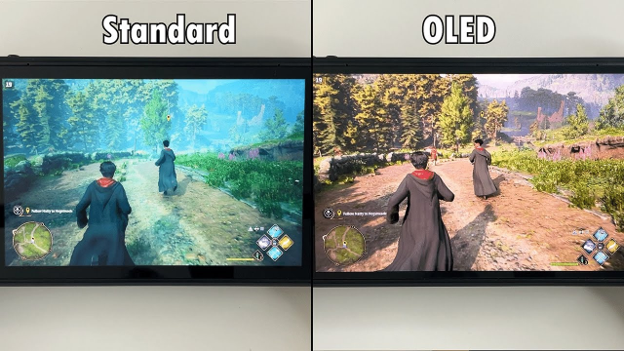
The Steam Deck OLED's features a 7.4-inch screen and uses OLED technology, which provides perfect blacks, infinite contrast ratio, and colors that look alive. When you're exploring a dark dungeon in Baldur's Gate 3 or piloting a spacecraft in No Man's Sky, the visual difference is immediately apparent. The OLED’s faster response time also makes motions look smoother while the menus seem more responsive leaving a more beautiful experience than any other console in the market.
The ROG Ally X counters with a 8.8-inch LCD display running at 120Hz instead of 90Hz. It's brighter (500 nits vs. 400), which makes it suitable for dimly lit rooms and gaming set-ups. The higher refresh rates makes it ideal for fast-paced games where shooters feel snappier and racing games have less motion blur with crisper gameplays. The extra screen real estate is welcome for strategy games where you're reading small UI text.
Gaming Performance and Game Library Access
The Steam Deck OLED runs SteamOS 3.x, a Linux-based system that uses Proton, a translation layer that runs Windows games through compatibility layers. This ensures that the vast majority of your Steam library works fine but there's always a small percentage of games that can present compatibility issues. Valve has spent years refining this, and it generally handles everything except the most demanding recent AAA titles with anti-cheat systems that resist compatibility layers.
The ASUS ROG Ally X runs Windows 11, which means native compatibility with every Windows game ever made without being dependent on compatibility layers or translation overheads. Newer, more demanding titles run without the optimization that Valve's compatibility team brings to the Steam Deck while also minimizing friction and assuring a smooth gaming experience everytime, anywhere.
Battery Endurance: Where the Real Divergence Happens
The Steam Deck OLED ships with a 50Wh battery which can provide roughly 5-8 hours of real-world battery life depending on what you're playing, with demanding games closer to the 5-hour mark. And while it may not be a lot, it’s usually sufficient until your next charge opportunity arrives.
The ASUS ROG Ally X includes an 80Wh battery, and that larger capacity combined with more efficient power management translates to 8-12+ hours of real-world gaming, depending on workload. And whether you’re thinking of an 8-hour workday with breaks, a cross-country flight, or even a weekend camping trip, it’ll get you through all of them without having you worry.
Thermals, Noise, and Long-Session Comfort
Both devices get warm during sustained gaming. The Steam Deck OLED runs cooler overall and is nearly silent, which creates an almost meditative experience during extended sessions. The quiet operation means you're hearing game audio and no one is being disturbed while you’re locked inside the gaming world.
The ROG Ally X, particularly under demanding workloads, runs hotter and produces more fan noise. And perhaps you could even justify it being a portable gaming PC but over an extensive gaming session, it’s something worth noting about. If you're sensitive to device noise or heat buildup, the Steam Deck OLED's quieter operation is genuinely more comfortable.

Pros and Cons
Steam Deck OLED
✅ Beautiful OLED display with perfect blacks and instant response
✅ Refined, proven handheld gaming experience
✅ Nearly silent operation, minimal thermal output
✅ Excellent Linux compatibility with Proton
✅ Smaller price entry point ($549)
❌ Shorter battery life (5-8 hours)
❌ Lower display brightness for outdoor use
❌ Windows games depend on compatibility layers
❌ Smaller screen for text-heavy games
ASUS ROG Ally X
✅ Exceptional battery endurance (8-12+ hours)
✅ Brighter display, better for varied lighting
✅ Higher refresh rate (120Hz) for faster-paced games
✅ Native Windows compatibility, no translation overhead
✅ Larger screen for strategy and UI-heavy games
❌ LCD screen lacks OLED's visual punch
❌ Runs hotter and louder than Steam Deck OLED
❌ Higher price ($799)
❌ Less refined ergonomics for some hand sizes
Which Device Is Right for You
Choose the Steam Deck OLED if:
1. You primarily play within arm's reach of power (home, office, short commutes)
4. You value screen quality and visual fidelity
3. You prefer a refined, quiet gaming experience
4. Your library is primarily on Steam
5. Budget is a factor
Choose the ASUS ROG Ally X if:
1. You travel frequently and need extended sessions without charging
2. You want native Windows gaming without compatibility considerations
3. You play newer demanding titles or games with strict anti-cheat systems
4. You prefer higher refresh rates and brightness for varied environments
5. You can accommodate the larger device and thermal output
Conclusion
The actual story is that the handheld markets in 2026 are now genuinely designed with different approaches to suit the needs of the users. The Steam Deck OLED is Valve's masterpiece of optimization and refinement while The ASUS ROG Ally X is the answer to what happens when Gaming PCs are built in compact sizes with an amazing battery life. And perhaps the ideal choice comes down to whether you’re looking for a richer but limited experience (OLED) or an uninterrupted and durable but comparatively loud option. And perhaps if you still can’t device, simply choose based on which aligns with your actual gaming needs.
Latest Posts