
Best Ergonomic Standing Desks for Remote Work Frame Stability, Motor Noise, and Weight Capacity Compared
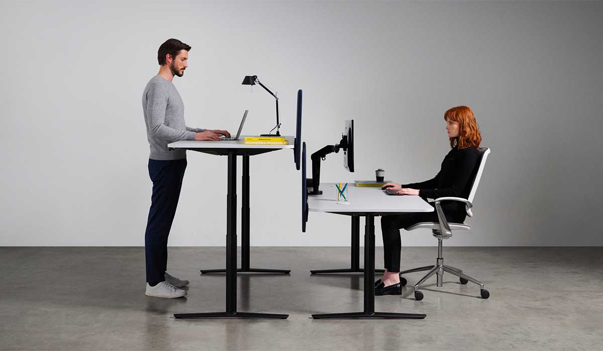
The world of standing desks is no different! Anyone who’s ever used a cheap standing desk at its standing height for more than a week is already annoyed with the wobble that it makes swinging your monitor and screens back and forth, a wobble that perhaps might not be enough to look broken or tip things over, but just enough to make you regret the purchase that you never began to cherish quite.
When it comes to Standing Desks, the difference between the eye-test of looks fine in the photos to the actual usability at full height, boils down to three specific that get far less attention than height range or the desktop material - it comes down to the frame’s stability, the motor noise and the weight capacity of the desk. And while we may understand them on a surface level at its face value, what isn’t common knowledge is the difference they make in regular usage, and how they differ across budget, build as well as long-term sustainability for the user.
Table of Contents
- Why These Three Specs Matter More Than the Others
- Frame Stability: What Actually Causes Wobble
- Motor Noise: What's Normal and What Isn't
- Weight Capacity: Ensuring Sustainability For The Future
- How to Choose Based on Your Setup
- Conclusion
Why These Three Specs Matter The Most
Most standing desk listings that you might’ve come across often lead with height range and desktop size and while they may come similar to promise, the wobble, noise or the stress overloaded frame are not specified on the product. Let’s be honest - it doesn’t make any sense for a desk to wobble, in fact a wobbly desk nearly defeats the purpose of having a desk in the first place because you’ll find yourself sitting without it more often than you’d realize.
Similarly, A motor that sounds like a small drill during every height change becomes a real problem the moment you're on video calls throughout the day and a frame rated for less weight than your actual setup (monitor arms, a PC tower, a monitor light, speakers) will wear out faster and bring you back to the same stress you were trying to avoid.
Frame Stability: What Actually Causes Wobble
The stability of an ergonomic standing desk, largely depends on two things - the number of motors that facilitate adjustments and the quality of the frame’s cross-bracing. In general, single-motor desks are more prone to uneven lifting and wobbliness as they use only one motor connected to both legs via a shaft but at the same time, they are also relatively cheaper. Dual-motor desks on the other hand, use an independent motor in each leg, which generally produces smoother, stable lifting and noticeably better stability at full height, particularly under load.
The Frame Design matters equally if not more! Desks that showcase a wider footprint, thicker steel gauge, and reinforced cross-bracing near the top of the legs tend to show meaningfully less sway when pressure is applied at the desk's edge. Reviewers often test this by pressing sideways on the desktop at maximum height, or checking whether a full coffee mug wobbles during typing.
Motor Noise: What's Normal and What Isn't
We’ve also probably experienced the cranking noise that motors make every time you adjust its height and while it may not be significant when you’re alone, it can get embarrassing really quickly on video calls or perhaps in shared spaces, often feeling more disruptive than you would ideally expect. Most reasonably built standing desks today operate somewhere in the 40-50 decibel range during height adjustment — roughly comparable to a quiet conversation or a running refrigerator.
If the desk makes a grinding or straining sound under load, it’s a subtle sign of the table being overloaded and the motor working harder than what is actually built for, also making it more prone to wobble or break apart in the future. If quiet operation during work hours matters to you, it's worth prioritizing dual-motor designs and checking for a specific decibel rating in the product spec sheet and perhaps, even avoiding the cheap range of desks, as they are eventually going to cause you trouble.
Weight Capacity: Ensuring Sustainability For The Future
Typical standing desks present a weight capacity rating around the range of 150 lbs on the budget models to 350-450 lbs on premium and heavy-duty options varying on the basis of their frame build and motor capacities. And while it may not feel significant now, a dual-monitor arm, a full-size PC and a desktop light along with a pair of speakers could easily take up to 60lbs of weight before you’ve even laid a piece of paper.
As a general rule of thumb, it is advisable to ensure that the capacity rating of your ideal table purchase is nearly 50% greater than what the normal setup with all attachments and equipment would weigh in total. Desks running closer to their maximum rated capacity tend to show more strain over time — slower lifting, more noticeable motor effort, and a higher chance of developing wobble sooner than a desk with real capacity to spare.
How to Choose Based on Your Setup
|
Your Setup |
Recommended Tier |
Understanding Why |
|
Laptop only, or single monitor on a desktop stand |
Budget |
Lighter loads rarely expose the stability gaps that show up under heavier setups |
|
Dual monitors on a desktop stand (not arm-mounted) |
Budget to mid-range |
Manageable weight, but a mid-range frame adds a safety margin as gear accumulates |
|
Dual monitors on a monitor arm |
Mid-range |
Arm-mounted monitors transmit frame movement directly to the screen, so stability matters more here |
|
Frequent video calls with mid-day height adjustments |
Mid-range or premium |
Consistent, quieter motors matter more when noise happens mid-meeting rather than just at day's start |
|
Multi-monitor or content-creation setup (PC tower, audio interface, multiple displays) |
Premium |
Higher realistic load pushes cheaper frames closer to their rated capacity, where strain and wobble are more likely |
|
Shared space, pets, or kids nearby |
Mid-range or premium with anti-collision sensor |
Automatic stop-on-obstruction is mainly available at these tiers |
Conclusion
As often the case amongst products that are marketed smartly, the real specs that actually determine its sustainability and efficiency are hidden far away from the product photo and specifications. And while they may not directly be observable, frame stability, motor noise and weight capacity are three properties that you’ll see scaling along with the product’s price and quality. Budget desks are not entirely useless either, they might work well for lighter, laptop-based setups and Mid-range dual-motor desks may suit those looking for a dual-monitor setup but the premium frames earn their value mainly for being able to hold multi-monitor or popular content-creation setups. Regardless of whatever tier you land on depending on your budget and use case ensure that the desk’s actual capacity and ability suit not just your budget but your setup and you’ll be more satisfied and dependent on the desk for many years to come.
Latest Posts