
How to Protect Your Car from Modern Cybersecurity Threats
Fortunately for you and your family, you don't need to be a cybersecurity engineer to significantly reduce your risks. You only need to know where the vulnerabilities exist and how to establish a few good guardrails.
What are ways that vehicles can be hacked right now?
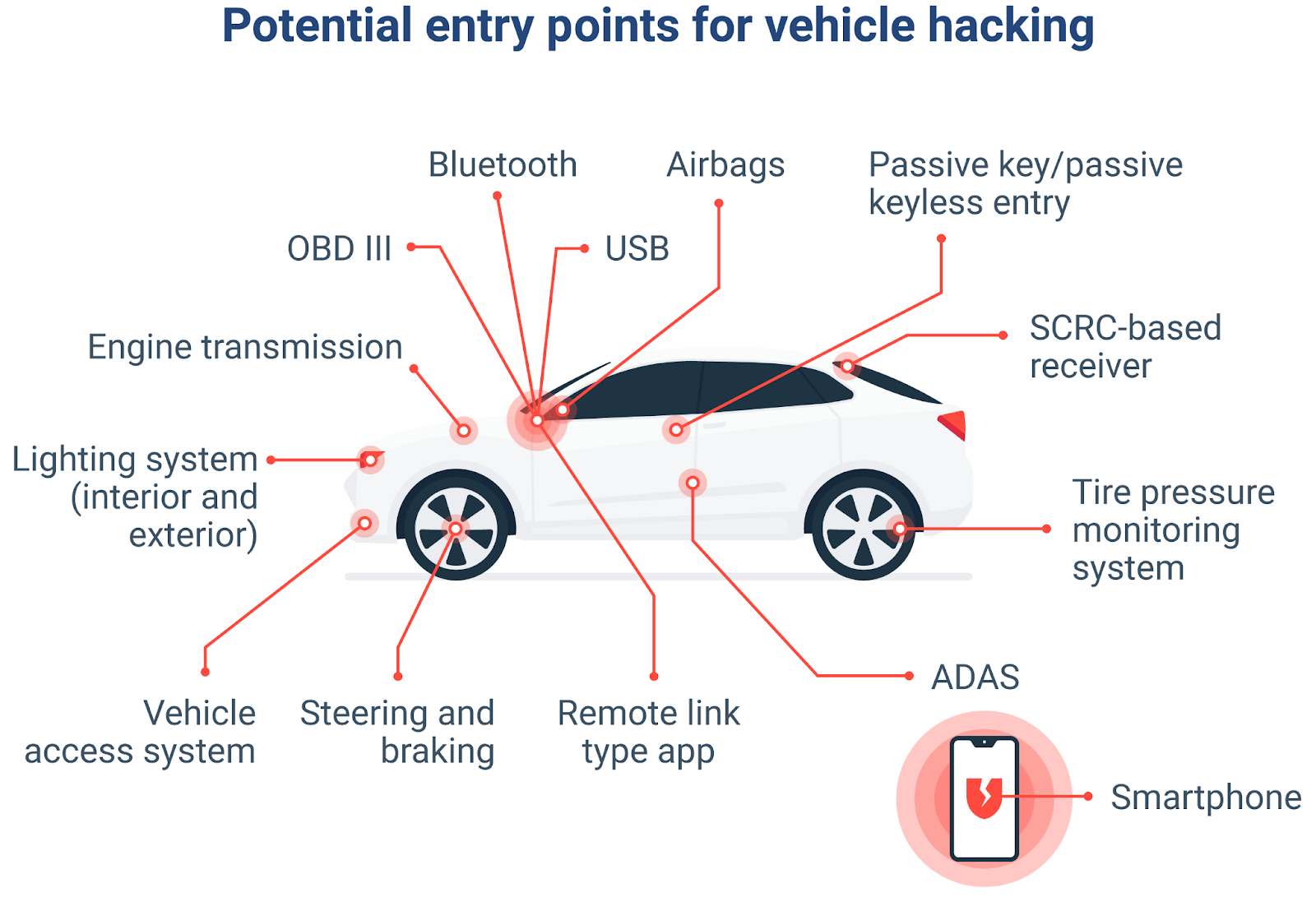
All vehicle systems are connected, so there are multiple ways for someone to hack a vehicle.
The newer the vehicle, the more "connected" the vehicle is, and thus the more vulnerable it may be to attack.
Examples of how attackers can hack a vehicle include:
- Keyless entry systems: Hackers can use a relay attack to amplify the signal from an owner's key fob so that they can unlock the vehicle. This often occurs when the vehicle owner's fob is within their home and the fob's signal is modified so that the key fob can be used to unlock a nearby vehicle.
- Mobile app vulnerabilities: Companion mobile applications, which many vehicles have today, can be compromised if the API is poorly secured or if someone has used a weak password.
- Infotainment touch screens / USB ports: Malicious software and other malicious devices can exploit bugs in the head unit, and in some cases, gain access to other vehicle systems.
- Third-party add-ons: If you install a low-quality OBD dongle, a low-quality tracking device, or low-quality telematics devices, the add-on may expose your vehicle to a cyber intrusion if it has a known vulnerability and if the device has not been updated.
As such, business-oriented drivers who rely on their vehicles for personal, business or rideshare related activities will experience direct losses, downtime, or legal liabilities as a result of these vulnerabilities.
Core Principles of Car Cyber Hygiene
Treat your car's cybersecurity like you would treat the security of a business, that is, by reducing entry points, hardening access points, and minimizing data leakage.
1. Secure Digital Access
~Use strong, unique passwords for the companion app of your car, and where multi‑factor authentication (MFA) is available, enact that as well.
~Do not share login information with your driver, valet, or mechanic; if several people require access, make use of official shared‑access features, do not have them use the same password.
~If your vehicle has a feature such as remote start or Wi‑Fi hotspot, turn that feature off through the vehicle's systems menu if it is not being used routinely.
2. Be Discerning When Connecting Devices
~Use only trusted OBD devices (from reputable manufacturers or OEM‑endorsed sources). You should not connect an OBD device to your automobile if you do not require one for insurance or fleet management purposes.
~Always treat a USB port in your automobile in the same manner as you would treat a USB port in an airport or other similar commercial building (i.e., do not connect an unknown USB device or cable).
~If your automobile offers support for Android Auto or Apple CarPlay and you routinely operate that way, you should prefer using the wireless option instead of the physical connection via a USB cable.
For Business Owners and Fleet Managers
To get the most out of connected technology based on your vehicle, understand car cybersecurity.
- If you rely on your vehicles as part of your business (sales force, logistics, rideshare), you also have increased risk:
- You should have a standard equipment and applications policy applied to vehicles in your fleet; you should outlaw the use of non-approved OBD dongles or tracking devices.
- Develop an asset inventory for your business’ fleet of vehicles which includes telematics units, SIMs and other applications installed in each vehicle. You should treat these vehicles the same as you would treat endpoints on your IT network.
- Create incident response playbooks for the most common events: compromise of a vehicle’s application, unauthorized remote access to a vehicle, loss of a device affixed to a vehicle (revoke tokens, reset passwords, notify insurers, etc.)
These are not frivolous steps; they help protect your fact that your corporate fleet has uptime & your company reputation and also limit your insurance limitations.
Don’t Forget the Data in Your Car
In today's vehicles, there is an abundance of private information stored, including contacts, call history, navigation, your home and work address, and applications such as Spotify and WhatsApp.
Before you sell your vehicle, turn in a lease vehicle, or give a vehicle to someone else to drive for a long time, you need to:
Restore your vehicle's infotainment system to factory settings.
Unpair any phones, and remove any previously saved Wi-Fi network information.
Log out of any connected accounts (music accounts, messaging accounts, voice command accounts, etc.).
Wipe your vehicle clean the same way you would wipe a laptop before giving it to someone else.
The Bottom Line: Treat Your Car Like a Smart Device
Because cars are more and more like rolling computers, you can use technology while minimizing your risk by clearly defining your security measures, securing access to the vehicle through applications or key fobs, not using untrusted devices, regularly updating the vehicle’s software, and wiping any usable data from the vehicle.
Latest Posts